Tag: ssh

  • Compiling SSH binaries

    This is if you’re sad and you like to do things yourself. Can be useful if you want to make mods to the source code too.

    Make sure you do these steps on the same OS version that you’re planning to deploy the binary to.

    1. Download it
      wget https://cdn.openbsd.org/pub/OpenBSD/OpenSSH/portable/openssh-9.6p1.tar.gz
    2. Install the pre-reqs, whatever they were
    3. tar -xzf openssh-9.6p1.tar.gz
    4. cd into it, run ./configure
      • My one complained about zlib versions coz security
      • So tried this next command again…
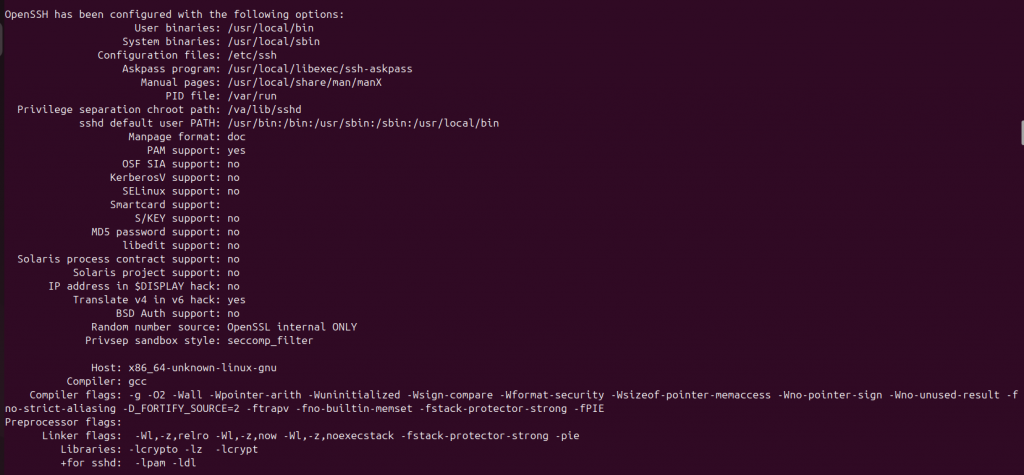
    5. ./configure –prefix=/usr/local –sysconfdir=/etc/ssh –with-pam –with-privsep-path=/var/lib/sshd
    6. Will get something like this if it goes to plan:
    1. make -j$(nproc)
    2. sudo make install
    3. it might moan about privilege separation user sshd does not exist
      • if building this binary on a machine without ssh server installed, the user sshd wont exit.
    4. so not sure which bits of these are actually needed:
      • sudo mkdir -p /var/lib/sshd
      • sudo chown root:root /var/lib/sshd
      • sudo chmod 755 /var/lib/sshd
      • sudo useradd -r -d /var/empty/sshd -s /usr/sbin/nologin sshd
    5. Run your new server:
      • sudo /usr/local/sbin/sshd -p 2222 -D -e

    To make changes to source and recompile (or whatevs):

    1. Make sure you’ve cd’d to your code, i.e., where your unzipped code is from step three.
    2. Make your changes to whatever file
    3. make -j$(nproc)
    4. sudo make install
    5. test your changes by running your binary again
      /usr/local/sbin/sshd -V if you’re playing around with the version string. Or whatevs.

  • SSH Dynamic Port Forwarding

    You have three boxes: A, B and C.

    A = Ubuntu client
    B = Ubuntu relay
    C = Windows RDP server

    Host B has two IP addresses, so two NICs, so is part of two networks. Using dynamic port forwarding like this is an effective way to pivot traffic from one network (where Host A is) to another (where Host C is) using Host B as a pivot between the two. This will also show how to access a service on Host C from Host A.

    Prep:

    • Install proxychains and xfreerdp on Host A
    • Install OpenSSH server on Host B
    • Ensure RDP service is enabled on Host C

    On Host A:

    • Edit proxychains.conf.
      • Add an entry like:
      • 127.0.0.1 9050
    • Setup dynamic port forward
      • ssh -D 9050 user@<relay-ip>
      • This creates an SSH tunnel between A and B.
      • Specifically, a connection to local port 9050 is made by the SSH client. Whenever a connection is made to this port by an application, it is forwarded over the secure SSH connection to a destination determined by the application, e.g., a web browser will send packets to google.com.
      • Also, this turns the localhost into a SOCKS proxy listener.
    • Run xfreerdp with proxychains
      • proxychains xfreerdp /v:target-server-ip /u:user /p:pass
    • Voila! You can now access the RDP service from your client machine.