This is if you’re sad and you like to do things yourself. Can be useful if you want to make mods to the source code too.
Make sure you do these steps on the same OS version that you’re planning to deploy the binary to.
- Download it
wget https://cdn.openbsd.org/pub/OpenBSD/OpenSSH/portable/openssh-9.6p1.tar.gz - Install the pre-reqs, whatever they were
- tar -xzf openssh-9.6p1.tar.gz
- cd into it, run ./configure
- My one complained about zlib versions coz security
- So tried this next command again…
- ./configure –prefix=/usr/local –sysconfdir=/etc/ssh –with-pam –with-privsep-path=/var/lib/sshd
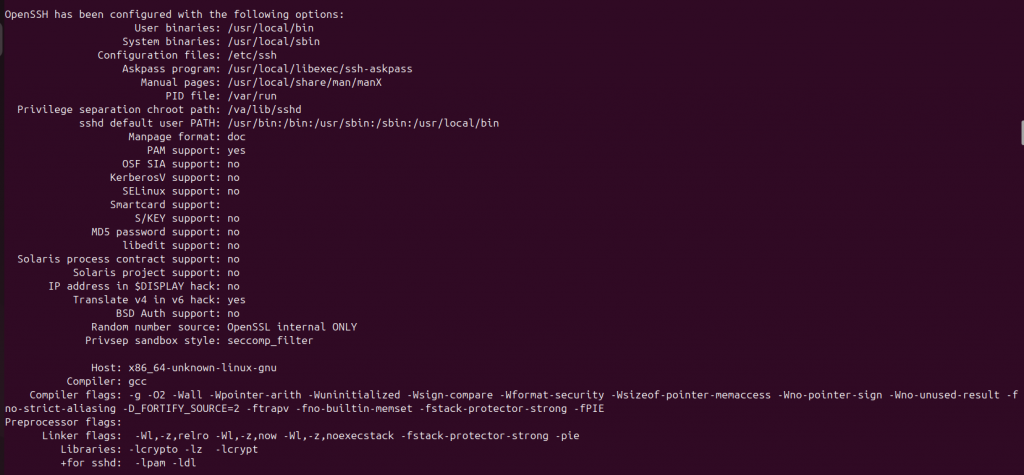
- Will get something like this if it goes to plan:
- make -j$(nproc)
- sudo make install
- it might moan about privilege separation user sshd does not exist
- if building this binary on a machine without ssh server installed, the user sshd wont exit.
- so not sure which bits of these are actually needed:
- sudo mkdir -p /var/lib/sshd
- sudo chown root:root /var/lib/sshd
- sudo chmod 755 /var/lib/sshd
- sudo useradd -r -d /var/empty/sshd -s /usr/sbin/nologin sshd
- Run your new server:
- sudo /usr/local/sbin/sshd -p 2222 -D -e
To make changes to source and recompile (or whatevs):
- Make sure you’ve cd’d to your code, i.e., where your unzipped code is from step three.
- Make your changes to whatever file
- make -j$(nproc)
- sudo make install
- launch the server again.
Leave a Reply